I-Blast > Blast management > Analysis > Sequence
This window is used to graphically play back the initiation sequence of a blast in order to check the detonation timing, the propagation of the initiation front and the overall safety of the surface wiring, particularly in the case of non-electric blasts.
Overview
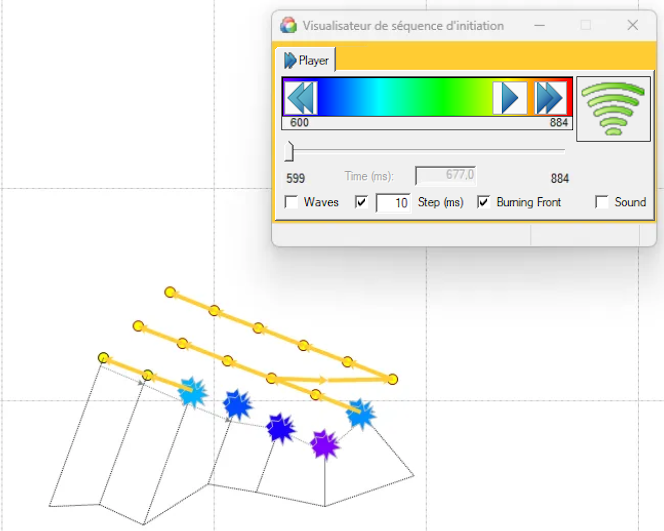
The window opens on top of the blast plan view, which is used as the scene for the visualization.
Detonations appear as coloured stars on the boreholes as time progresses.
The colour of each star matches its firing time according to the gradient of the progress bar.
Progress bar
The main bar represents the total duration of the sequence, from the first detonation (on the left, in blue) to the last one (on the right, in red).
The values displayed below the bar give the time bounds in milliseconds (for example 600 ms and 884 ms).
The colour gradient (from blue to red through yellow) matches the colour scale used to render the detonations on the blast plan view.
Each charge is therefore displayed with the colour corresponding to its firing time.
This correspondence makes it possible to visualize the time progression of the blast directly on the main view.
Playback buttons
The buttons located on either side of the colour bar are used to control the playback:
⏪ Start: jumps back to the first instant of the sequence.
▶️ Play: starts playback of the sequence from the current time. Changes to a ⏸️ button while playing.
⏩ End: jumps to the last instant of the sequence.
Time slider
The slider located below the colour bar is used to manually move to a specific instant of the sequence.
The Time (ms) field displays the current value of the slider (for example 677.0).
The values on either side of the slider show the minimum and maximum bounds of the sequence.
Display options
The check boxes at the bottom of the window are used to configure how the sequence is rendered.
Waves
When this box is checked, the viewer displays the propagation of the detonation waves as circular fronts spreading from each charge.
This option is useful to analyse the interactions between neighbouring charges and to estimate wave overlaps during the blast.
Step (ms)
This value can be adjusted to slow down or speed up the analysis of the sequence, depending on its duration and on the time spacing between charges.
Burning front
When this box is checked, the viewer draws the surface wiring lines connecting the detonators to each other, and shows the propagation of the initiation front through the network over time.
On the main view, the yellow coloured segments represent this front as it progresses on the surface of the blast.
This option is used to check the overall safety of a non-electric blast
Sound
Enables the audio playback of detonations during the sequence.
Each charge firing is accompanied by a sound signal.