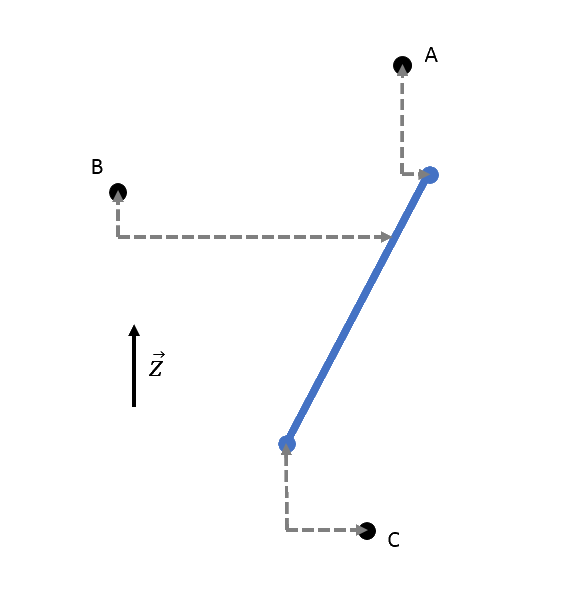
There are different ways of calculating the distance between the loads and zones for seismic calculations:
- 2D
- 3D
- 2D+H
You can select the mode to be used for your site in the options window.
2D
In this mode, the distance is calculated in 2D in the XY plane.
The Z difference between the load and the measurement point is therefore ignored.
Formula for distance between 2 points A(xa,ya,za) et B(xb,yb,zb):
$D=\sqrt $
As a load is not necessarily a point, the distance used is the minimum distance between the measurement point and the segment representing the load.
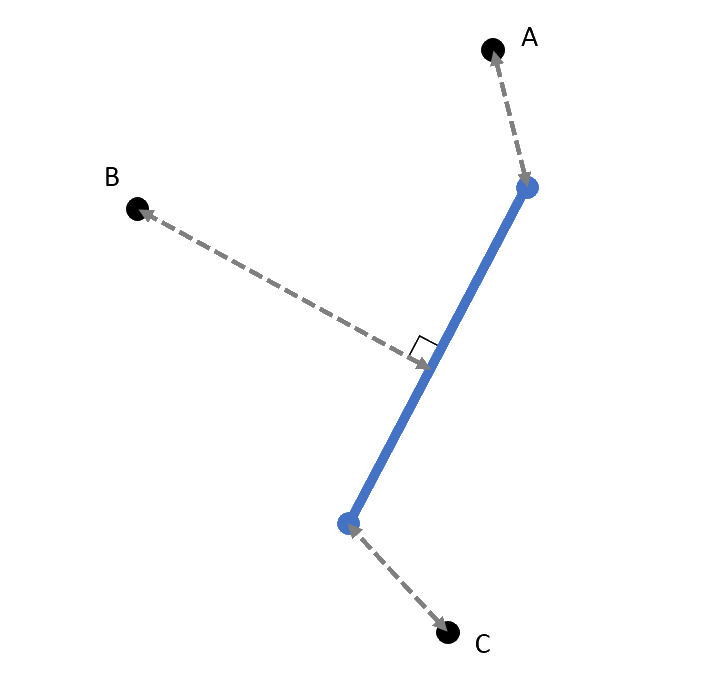
In the diagram above, the minimum distance between the segment and points A and C corresponds to the distance to one end of the segment.
For point B, the minimum distance corresponds to the distance between the point and the line on which the load is located.
3D
3D mode is similar to 2D mode, but the distance calculation takes into account the Z coordinate of the points.
Distances are calculated in straight lines in space.
Formula for distance between 2 points A(xa,ya,za) et B(xb,yb,zb):
$D=\sqrt $
For the distance between a point and the load, the methodology is the same as for the 2D distance.
2D+H
In 2D+H mode, the calculation is performed in 3D, but the distance is not taken in a straight line.
The distance corresponds to the 2D distance to which the difference in altitude is added.
Formula for distance between 2 points A(xa,ya,za) et B(xb,yb,zb):
$D=\sqrt+|z_b-z_a|$
The distance between the measurement point and the segment representing the load corresponds to the minimum distance between the point and all the points on the segment.