I-Blast > Blast management > Blasts > Site > 🖊️ (Site parameters)
Preview
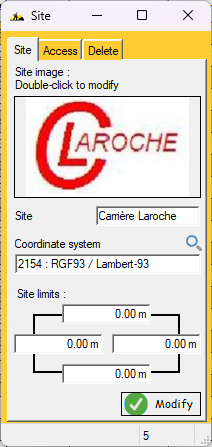
This window lets you view and modify information on the current site.
Only a user with Admin rights on the site will be able to make modifications.
Site information
The Site Image field defines the logo used for the site.
To modify the image, double-click on it. An image selector opens to choose a new image.
The Site field defines the name of the site.
The Coordinate system field is used to define the coordinate system used for the site's blasts.
You can search for a coordinate system by its EPSG number or by its name.
The
button opens a tool for finding the coordinate system used, using a point with known coordinates and a map.
The Site limits fields are used to define the site boundary.
This information is used when using the AutoDrill module to determine whether a drilled hole that could not be associated with a blast or site by any other method is part of this site.
The Modify button saves the modifications.
Access
This tab lets you share the site with other I-Blast users.
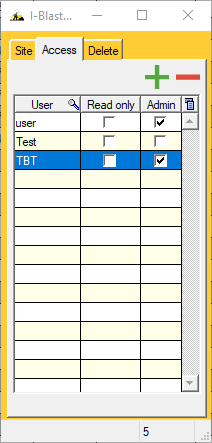
To add an access, click on the  button.
A popup window opens to select the user for whom a site access is to be added.
The  button removes the site access of the selected user.
The table displays the list of users with access to the site and their rights.
The Admin box gives management rights to the site. The user will therefore be able to modify information and the access to the site...
The Read-only box is used to define that this user has a consultation only access the site. A read-only user cannot create or modify blast in the site, but can only view information.
Delete site
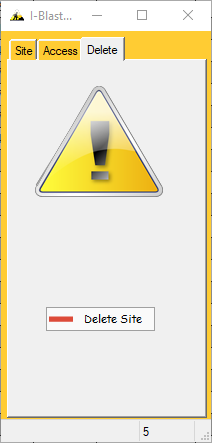
This tab allows you to delete the site using the Delete site button.
As this operation is definitive, a confirmation message is displayed to confirm your choice.
When I-Blast is deleting the site, the blast are deleted progressively. It is possible to cancel the deletion by clicking on the 🛑 STOP button, but it is not possible to recover blasts that have already been deleted.
⚠️ This operation is irreversible, and all data of the site's blasts will be permanently deleted.
Make sure you have properly backed up the data you want to keep before deleting the site.