I-Blast > Blast management > Global > Help > ? > Incident / Suggestion
I-Blast > F2
Overview
This window allows I-Blast users to send suggestions and incidents directly from the software to the development team.
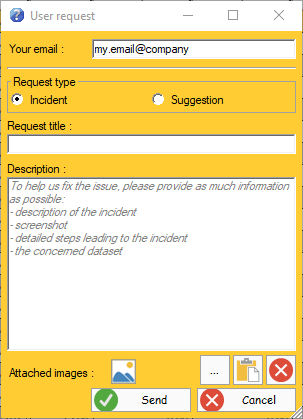
User request
Your email field allows you to enter the email address that will enable the development team to contact you in order to, for example :
- request additional information
- tell you that the incident/suggestion has been fixed/implemented
- let you know if the feature already exists or if it is possible to achieve the same result using another feature
- provide you with tips on how to get around an incident
The Request type selector allows you to indicate whether your request is a suggestion or an incident report.
Request title allows you to give your request a name so that it can be easily referred to in future exchanges. The name should be a short summary of the request, highlighting the key points.
Use Description to describe your request.
In the event of an incident, to help us deal with it, please provide as much information as possible:
- description of the incident
- screenshot
- detailed steps leading up to the incident
- the dataset concerned
In the case of a suggestion, please describe in as much detail as possible the functionality you would like to see added to I-Blast.
To help us better understand the problem and develop the feature to meet your expectations, please indicate :
- the context
- the objective
- the input data
- the expected result
Please feel free to illustrate this with images/diagrams and share your ideas about the function's interface/process.
Next to Attached images the  icons indicate the images attached to the request.
When hovering over these pictograms, a preview of the images is displayed instead of the Description field.
The ... button opens an image file selector to chose an image to attach to the request.
The  button retrieves an image from the clipboard and attach it to the request. This image could, for example, correspond to a screenshot.
The  button removes all images attached to the request.
Once the various elements of the request have been filled in, the Send button is used to send the request to the I-Blast development team.