I-Blast > Blast Management > Analysis > Audit > Drilling
I-Blast > Blast Management > Blasts > Design > Analysis > Audit > Drilling
Preview
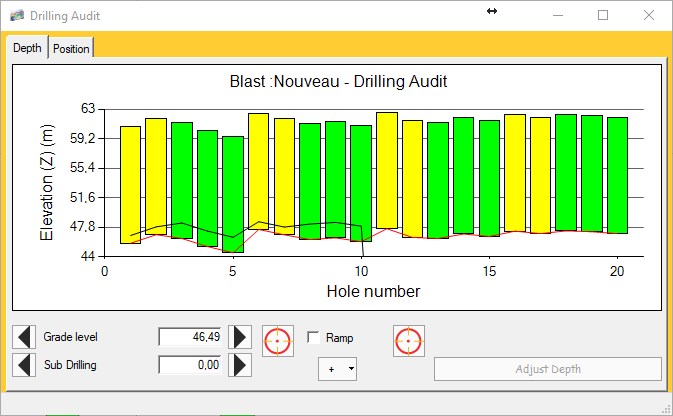
This window allows you to view and analyze the drilling of the selected holes / blast.
This window is divided into 2 tabs:
- The
Depthaudit - The
Positionaudit
Depth audit
In this tab you can visualize the Z level and the holes' depth, as well as to adjust the depth in function of the Z level to be reached.
The graph displays the selected holes or all the holes if no hole is selected.
For each hole, it displays a bar of the color of the hole between the surface Z and the bottom Z of the hole.
A red line connects the real holes bottoms.
A black line represents the objective grade level (without the subdrilling)
When the window is opened, the graph represents the current situation of the blast plan.
The Grade level field is used to define the elevation to be reached for the selected holes.
The Sub Drilling field extends the holes below the grade level as a security measure.
The arrows on each side of these fields allow you to increment/decrement them by 0.5m.
When modifying these fields, the graph is updated to give an overview of the situation.
In order to apply these modifications to the holes click on Adjust depth.
It is possible to define a non-horizontal grade level using the Ramp option.
When this box is checked, a 2nd Grade level field and two buttons appear.
In order to define the ramp, two waypoints must be defined. In order to do that :
- Click on a
 button
- Click on the hole that will be used as a waypoint
- Define the
Grade levelof this point in the field associated with the button - Do the same for the 2nd waypoint
An arrow appears on the map to show the direction of the ramp.
The + button offers various additional options:
- The
Allow extensionoption defines whether or not the holes can be extended (in case of holes already drilled for example) - The option
Display current depthredisplays the graph with the current situation of the blast plan. - The
Zero subdrillingassigns a subdrilling equals to 0 to holes whith subdrilling and grade level not defined.
The grade level are therefore assigned to the current bottom Z of the holes.
The depth adjustment functions are only available if the window is opened from the design window.
If the window is opened from the blast management window, only the consultation function is available.
Position audit
This tab is used to detect intersecting holes.
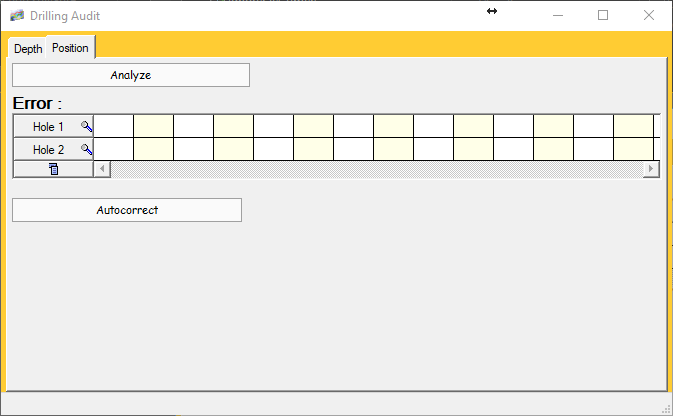
The Analyze button triggers the search.
After clicking on this button, the table is filled with the indices of the intersecting hole pairs.
The Autocorrect button removes for each pairs of holes one of them. This function is useful only in case of duplicate hole.