I-Blast > Blast management > Blasts > Design > Design > Set up > Zones
Overview
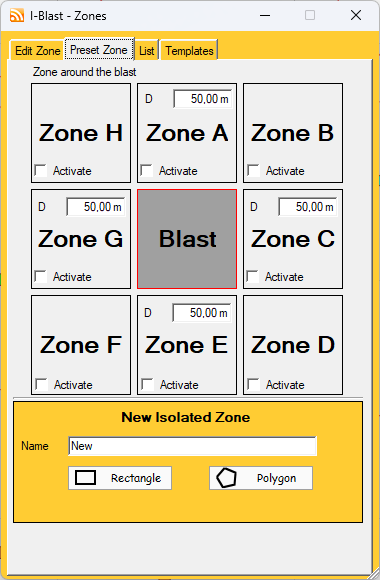
This window lets you manage the zones of the selected blast, as well as the site zones (shared by all blasts on the site).
These zones are used as reference points for seismic and overpressure calculations.
Preset zones
Zones around the blast
By default, an area corresponding to the rectangle containing all the holes in the blast is delimited and displayed on the blast plan.
The upper part of this window shows a set of zones around the blast that can be created and activated.
Clicking on the Activate checkbox will create the zone in the selected area around the blast. The size of the zone created can be configured using the D input field located on each of the four sides of the blasting area.
New zone
The lower part of this window allows you to create a new zone freely on the blast plan. This zone, named using the name entered in the Name field, can be drawn as a rectangle or as a free polygon.
Rectangle: aleft clickon the blast plan will position a rectangular area of dimension 10m x 10m, the center of which is the click location.Polygon: aleft clickon the blast plan will position the first point of the polygon. Subsequentleft clickswill add a segment to this polygon.Double-clickto close the polygon.
Once the zone has been created, it is automatically redirected to zone editing.
Edit zone
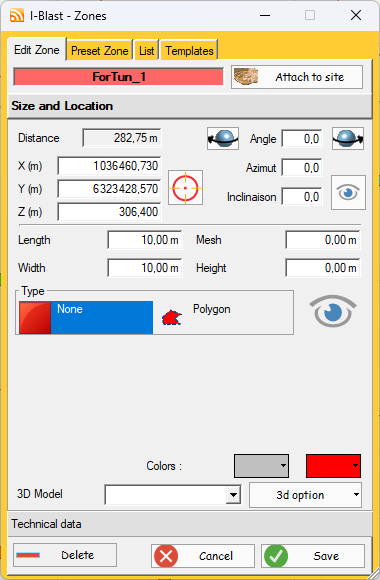
The Attach to site button in the top right-hand corner associates the zone with zone templates. This makes it possible to attach the zone to the site, so that it can be viewed on other blasts from the same site.
Size and position
This window allows you to view and edit the following information for the selected zone:
- If square :
- Angle
- Azimuth
- Inclination
- Position of the entire zone on the blast plan (x,y,z)
- Length
- Width
- Mesh size
- Height
- Fill color
- Border color
- The 3D model used for 3D display of the zone
- Show 2D base: displays the zone contour in 3D mode
- Fit to zone: performs a 2D homothety on the size of the 3D model
- Stretch to zone: stretches the model over the zone (in 2D)
- Lock proportion: adapts the zone size (x,y,z) to the 3D model
- If it's a polygon, you can also modify the position of each of its segments by modifying the values entered in the polygon segment summary table.
You can also add or remove segments using the+and-buttons.
You can also modify the shot plan graphically. To do this, simply select a point by
left-clicking, thenleft-clickingagain and holding while moving the mouse cursor to the desired location.
The eye icon at the top allows you to change the active view to the zone view, or to create a new view (if available in the current I-Blast license) if the angle and azimuth are modified.
The eye icon at the bottom of the screen lets you change the zone's visibility on the blast plan.
Technical data
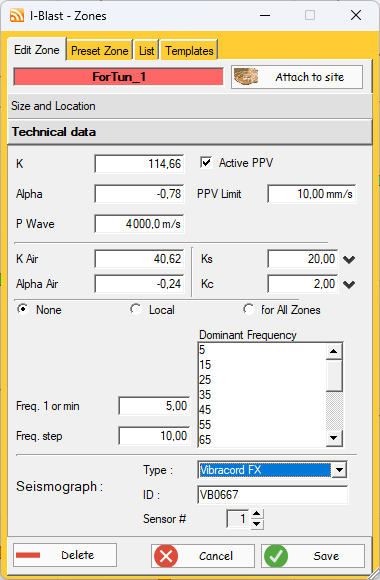
This window allows you to view and edit technical information for the selected zone:
- Seismic data
- K
- Alpha
- P Wave velocity
- PPV Limit
- PPV active : checkbox to activate or deactivate the zone for inclusion in the various calculations
- Air overpressure data
- K
- Alpha
- Russian standards calculation module
- Ks
- Kc
- Frequencies
- A selector is available to choose the reference signature hole if needed
- None: corresponds to no reference signature hole
- Local: corresponds to the selection of a signature hole local to the blast
- For all zones: corresponds to the selection of a signature hole stored on the site
- A selector is available to choose the reference signature hole if needed
- Seismograph associated to the zone : used to link automatic signal retrieval from DNA-Monitor and Autosis
List
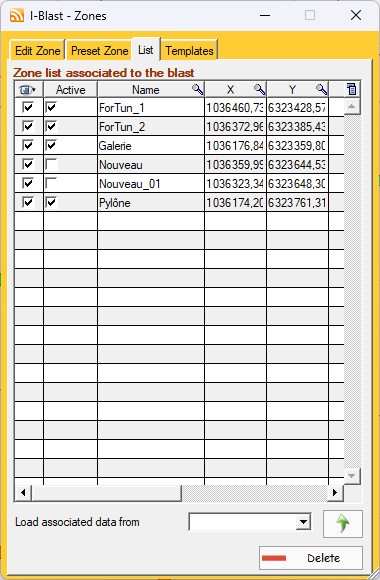
This tab lets you view all the zones on the site and edit certain information:
- Show / hide the zone on the blast plan
- Activate / deactivate the zone: this means that it is taken into account or not in the various zone-related calculations.
- Modify zone names by double-clicking on them
The Load data associated with selector allows you to select an attenuation law stored on the site. The arrow button on the right automatically fills the K and Alpha values of the selected zone with those of the previously selected law.
Templates
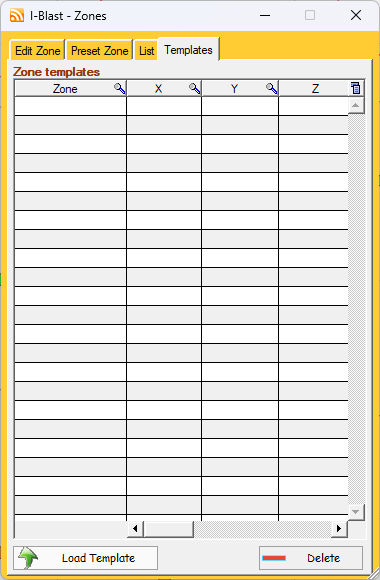
This tab lists all zones associated to the site.
The Delete button unlinks the selected zone from the zone templates, thus detaching it from the site.
The Load Templates button is used to load selected zone templates into the current blast.