www.i-blast.net/IBLicenseManager
Overview
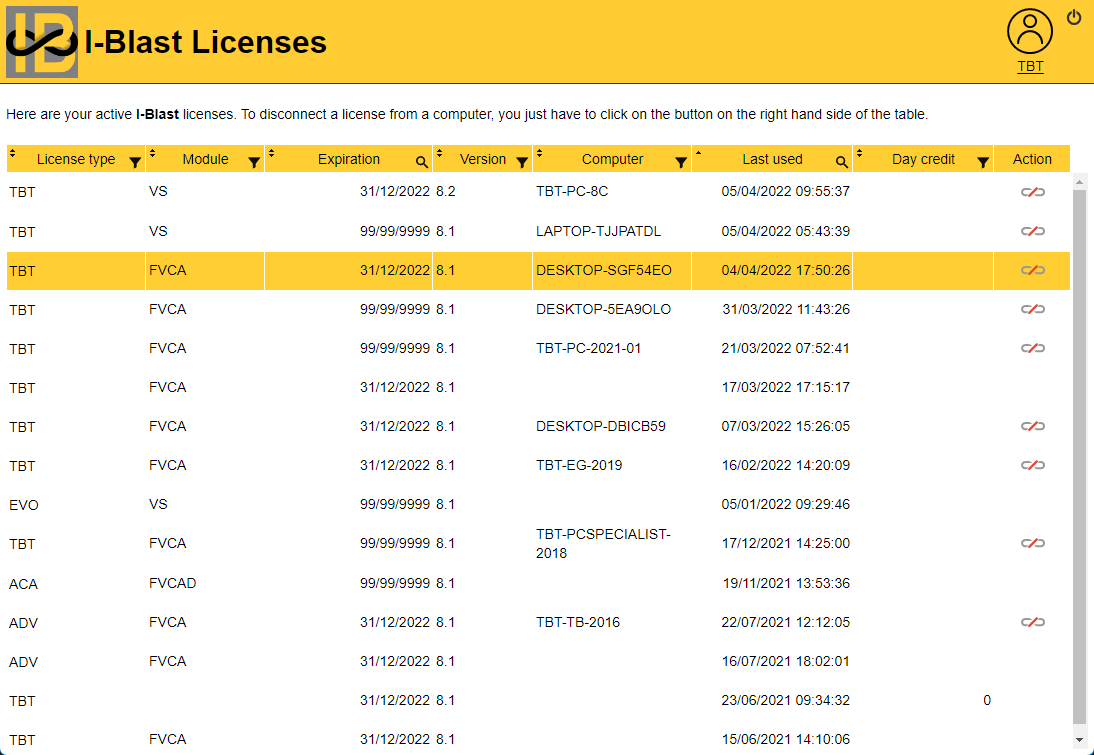
This platform is used to manage I-Blast WEB licenses associated with a license account.
To access this feature, it must be activated by DNA-Blast.
Send an e-mail to support@tbtech.fr for more information.
To access this platform, use the login and the administrator password for your account.
This password is different from the activation code used to access the licenses in I-Blast.
Licenses management
The main page displays the licences of the connected account and the device to which they are linked.
To unlink the I-Blast licence from the device, simply click on the  button and the licence will be available for use on another device.
It is not possible to disconnect licenses that have been in use within the last hour.
Account management
Clicking on the account name in the top right-hand corner opens the account management page.
The two buttons on this page allow you to:
- Change the license activation code (used to connect to licenses from I-Blast)
- Change the administrator password (used to connect to the license management platform).