Login > Tableau de bord
Overview

This page is the main page of Dashboard and provides access to all the modules to which the logged-in user is entitled.
It is made up of three distinct parts:
Main menu

Depending on the rights of the logged-in user, different entries will appear here:
- Period: Switches the display area to period mode. In this mode, the dashboard displays statistical graphs based on aggregated data for all blasts between two dates.
- Blast: Switches the display area to blast mode. A drop-down menu below the site selection bar lets you choose the blast for which the report information will be displayed.
- Account: Opens a page summarizing the logged-in user's information. Some information can be modified.
- Language: Opens a submenu allowing you to select the Dashboard display language.
- Logout button: Logs the user out and returns to the login screen.
If the user is an administrator, an
ADMINoption corresponding to access to the website administration pages is added to the top of the menu.
Sites selection

This area allows you to select a site (highlighted in blue) on which to perform the search.
The sites available in this bar are those to which the I-Blast user linked to the Dashboard user is entitled.
Period mode
In Period mode, the display area shows a dashboard for tracking KPIs of the blasts between two dates. It is made up of various graphs described in the dashboard section.
Menu

The dashboard management menu allows you to perform various actions and recall certain information from the current display:
- A reminder of the currently loaded configuration, here
DEFAULT. - A reminder of the selected period, here from
20/02/2023 11:59to20/02/2024 11:59.  : Allows you to change the period over which to display the report
 : Allows you to customize the dashboard
 : Create a sharing link on the selected period and site so that other Dashboard users can view the same aggregated data. This link is automatically copied to the clipboard. (equivalent to CTRL+C).
 : Print a PDF report with visible information on the current dashboard configuration.
You must click on the card loading button (in the card graph frame) before clicking on print in order to view the cards in the PDF report.
Period selection
Click on the button to change the period of data displayed.
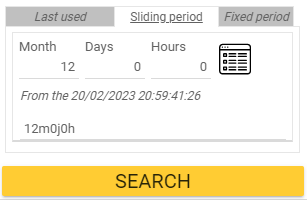
Once the period has been selected, clicking on the 'Search' button produces a report compiling the data of the blasts for that period.
To understand how the period selector field works, see this page.
Customization
You can customize the dashboard view by hiding certain graphs and modifying the layout of the remaining graphs.
By default, the "DEFAULT" configuration is displayed on each site's dashboard. It displays all available graphs and cannot be modified.
The button opens a menu allowing you to create a new configuration by selecting New configuration.
If other configurations are already present, the Load configuration entry in the same menu allows you to list them and select which one to display.
Once a configuration has been created, it can be customized via the Edit configuration menu:
Move widget: the dashboard switches to editing mode to graphically move visible widgets.Add widget: a table displays the widgets available for addition.Compact widget: fills any gaps in the dashboard.Delete widget: reveals a delete button on each widget displayed to remove widgets from the current configuration.
The Delete configuration option deletes the current configuration.
A 🗑️ button is also available in the list of configurations accessible from
Load configurationfor deleting the selected configuration.
TheDEFAULTconfiguration and the one currently displayed cannot be deleted by this button.
Dashboard
- G2 - Number of blasts per date: grouping available per day / per month / per year
- G3 - Quantity blasted per blast
- G4 - Quantity blasted per month and cumulated over the period
- G5 - Explosive consumption per blast: theoretical and actual
- G6 - Specific load per blast: theoretical and actual
- G7 - Linear meters drilled per blast
- G8 - Linear metres drilled per month and cumulative over the period
- G9 - Visual blast on a map: Customizable color scale
- G10 - Visual display of compressive strength: Customizable color scale
- G11 - Blast quality index
- G12 - Carbon footprint
- G13 - Cost analysis
- V1 - Maximum vibration level per blast (all zones combined)
- V2 - Maximum vibration level per zone: each available zone can be selected in the left ribbon
- V3 - Vibration level distribution: Customizable color scale
- V4 - Distribution of vibration levels by zone, in terms of number of blasts: Customizable color scale
- V5 - Maximum vibration level (all zones)
- V6 - Maximum vibration level per zone
- V7 - Maximum vibration level on a card: Customizable color scale
- V8 - Zone attenuation law: set the regression line using a slider at the top of the graph.
- S1 - Maximum overpressure level per blast (all zones combined)
- S2 - Maximum overpressure level per zone
- S3 - Distribution of overpressure levels (all zones combined): Customizable limits and colors
- S4 - Distribution of overpressure levels by zone: Customizable limits and colors
- F2 - Display of percentage of passing: Customizable passing values
Blast mode
In Blast mode, a report is displayed with the main information of a blast.
A drop-down list just below the site selection banner lets you select which blast to display. It contains all the blasts of the site, sorted by date of blast, from the oldest to the most recent.
By default, the most recent blast is selected.
Blast report content
The blast report allows you to display the main information about the blast and to display certain graphs with its data.
Header :

- Name of blast
- Date and time of blast
- Number of holes
- Comments on blast
- Blast quality index
- Redirect to blast video(s) at bottom of page
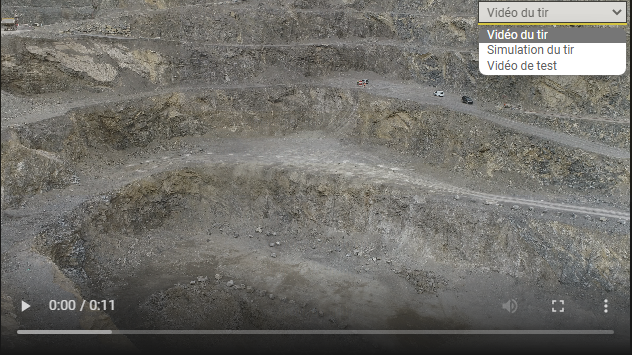
The selector in the top right-hand corner lets you choose which video of the blast to watch.
These videos come from a URL link entered from I-Blast
Dashboard player only supports Youtube© and Dropbox© links
Body :
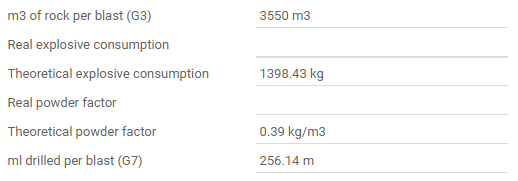
- G3 - Quantity blasted for this blast
- G5 - Explosive consumption for this blast
- G6a - Actual specific charge for this blast
- G6b - Theoretical specific charge for this blast
- G7 - Distance drilled for this blast
- Before / after blast photos
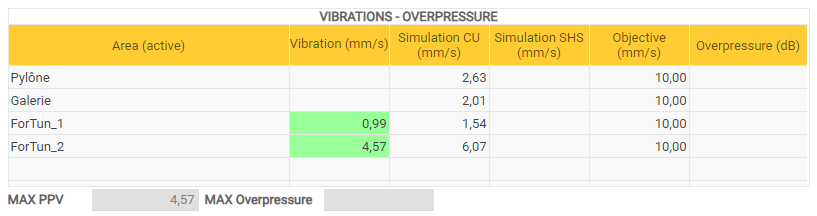
- A table showing vibration levels and overpressure for each active zone of the blast
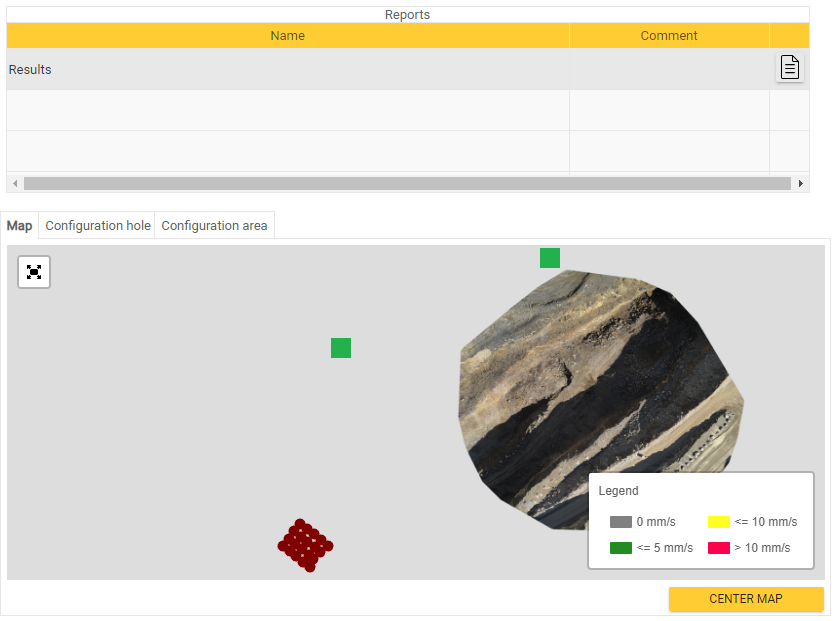
- A table containing the reports generated for this blast
- A customizable card showing the holes (circles) and zones (squares) of the blast
- A customizable graph showing the fragmentation distribution of the blast
- The player of the blast videos imported from I-Blast