I-Blast > Blast management > Analysis > Seismic > Overlap
I-Blast > Blast management > Blasts > Design > Analysis > Sequence > Overlap
Overview
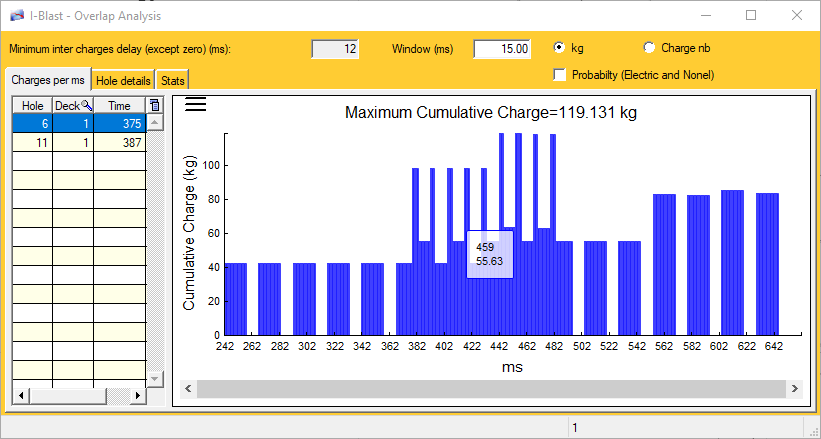
This window lets you analyse the timing of the blast and check if several charge overlap.
Charges per ms
This graph display the charge number or quantities that detonate at each time of the sequence. It is hence possible to easily check if charges detonate concomitantly.
The following parameters can be adjusted:
- Time
Windowin milliseconds over which one charge can interfere with the others. - if the graph should display explosive quantities (
kg) or number of charges (Charge nb) - Display of probabilities (electrical and Nonel)
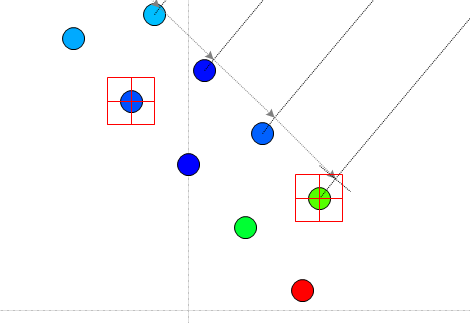
If the design window is opened, when hovering on the graph, hole detonating at the time under the pointer will be highlighted on the blast design view by a red target.
It is then possible to see which holes detonate simultaneously.
When clicking on the graph, the table on the left display the charges detonating at the selected time.
It is possible to modify the timing of the charges directly in this table.
Hole details
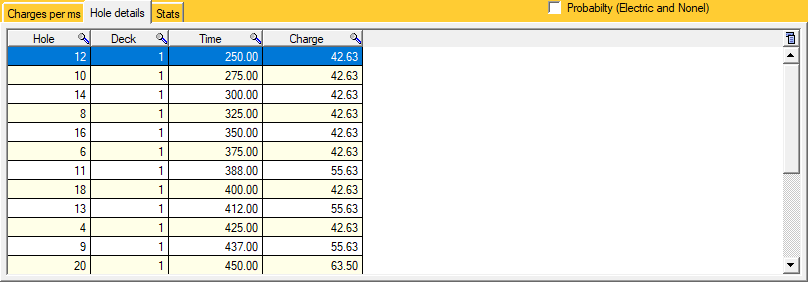
This tab displays all the charges details of the blast.
Stats
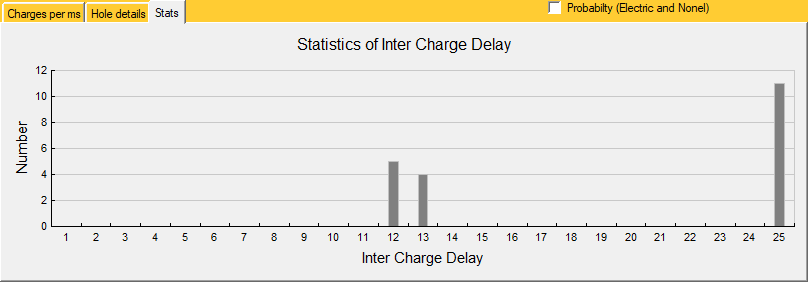
This graph shows the statistics of the delay between detonation.