I-Blast > Blast management > Analysis > Seismic > Signature Hole
I-Blast > Blast management > Blasts > Design > Analysis > Seismic > Signature Hole
Preview
Record
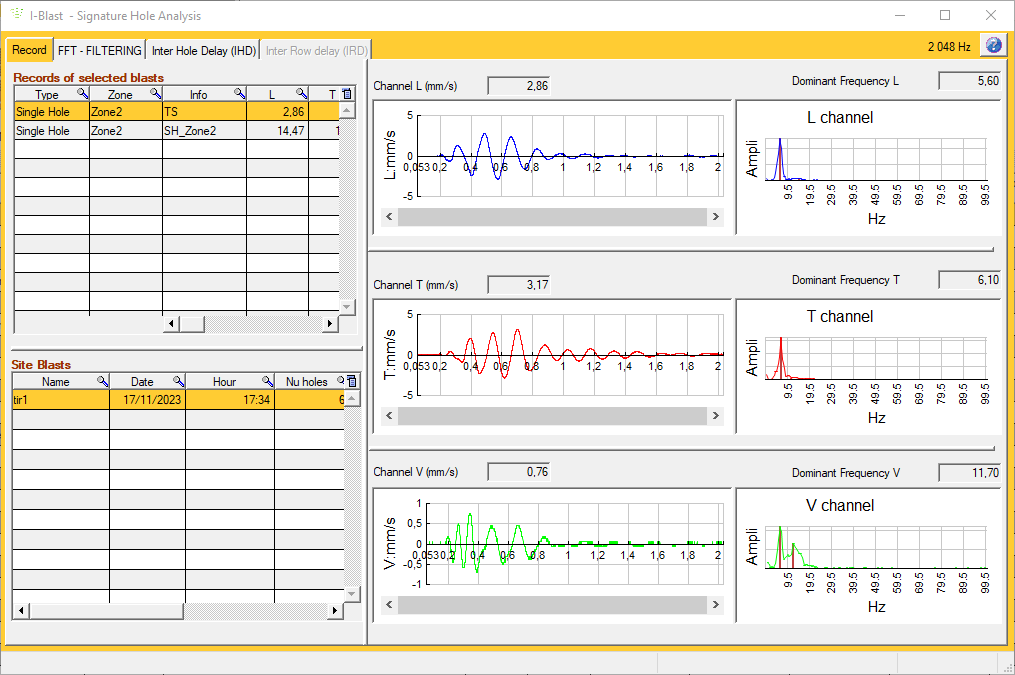
This tab allows you to search for and select the signature hole signal(s) to be used in the analysis.
The Records of selected blasts table at top left displays the list of signature hole signals for all the blasts selected in the Site blasts table below.
Only blasts with at least one signature hole signal are displayed in this table.
To select several blasts, use CTRL or SHIFT keys.
The right-hand side of the window displays the selected signal.
For each channel you can find :
- PPV value
- Dominant frequency in Hz
- Signal curve
- Fourier transform of the signal
At the top right of the window is a reminder of the signal's sampling frequency (in this case 2048 Hz) and a ? button for displaying the selected signal's metadata.
FFT - Filtering
Inter Hole Delay (IHD)