I-Blast > Blast Management > Measurements > Implementation > DNA-OnSite
Overview
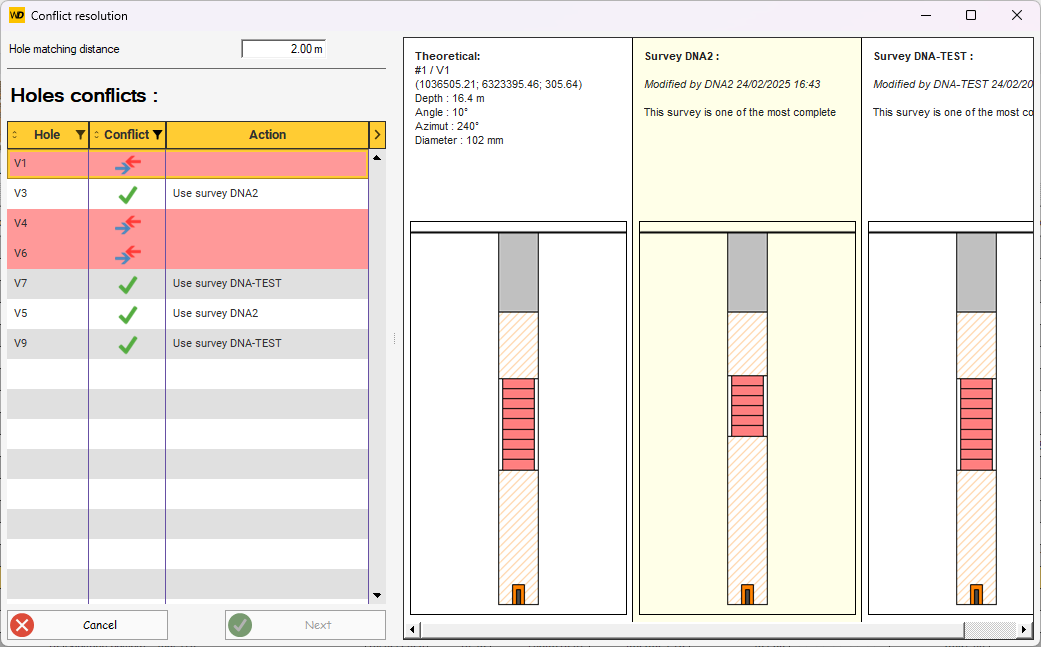
This window is used to merge several surveys performed with the DNA-OnSite application.
Hole matching
In order to merge blast plans, the merge module must be able to find the correspondence between the holes in the various surveys and those in the theoretical blast plan.
To do this, it is necessary to define a Hole matching distance, which identifies whether a hole whose position has been modified is the same as the one in the theoretical blast plan.
This matching distance is applied in 2D in the main view of the blast plan.
If no match can be made for a hole, it is considered a new hole.
Changing the value of Hole matching distance will initiate a new search for matches between holes and reset any conflict resolution that may have been performed previously.
Geometry and loading conflict resolution
If several tablets have recorded information about the same hole, either its geometry or its loading, a conflict is generated.
All conflicts are presented in the Hole conflicts table.
For each conflict, the software will attempt to determine the most complete survey.
Here is the list of states considered from least to most complete:
- General information modified (name, water level)
- Geometry modified (position, angles, depth, diameter)
This status also includes holes marked as deleted. - Loading in progress
- Loading complete
If one survey is more complete than the others, the conflict will be resolved automatically.
If the holes are in the same state, the conflict will have to be resolved manually and will be highlighted in the table.
By default, the table shows all conflicts, resolved or not.
It is possible to toggle the display to show only unresolved conflicts, or to show all holes even if there are no conflicts in the table's contextual menu, accessible by a right-click.
When a conflict is selected, the various surveys are displayed on the right-hand side of the window.
For each survey, the information that has been modified and the hole loading are displayed.
Simply click on the version of the hole to keep in order to resolve the conflict and move on to the next one.
When hovering over the loading diagram, details of each load appear.
It is not possible to mix information from several surveys.
For example, it is not possible to use the position from one survey and the loading from another.
Once all conflicts have been resolved, click on the Next button to validate the hole conflict resolution and move on to the next step.
If wiring conflicts are found, the wiring conflict resolution will be displayed, otherwise the survey merge will be performed directly.
Wiring conflict resolution
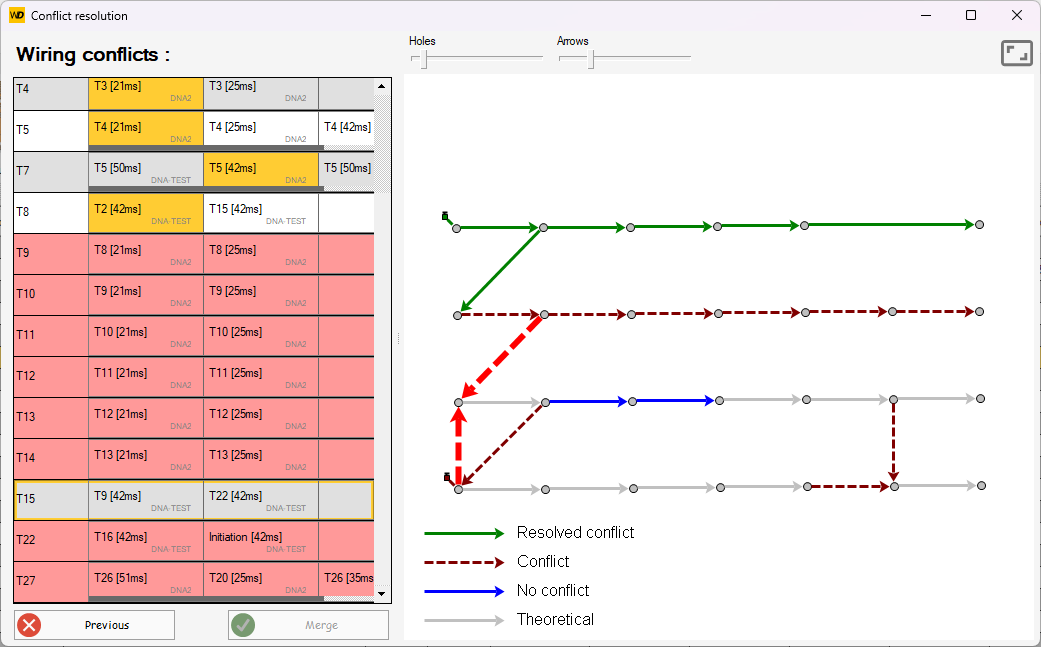
If the wiring has been modified on several tablets, conflicts may arise.
For each hole to be wired, the various wiring origin alternatives are presented in the Wiring conflicts table.
Click on one of the alternatives to select it and resolve the conflict.
The diagram on the right dynamically displays the blast plan wiring.
This diagram shows only the hole-to-hole connections required for conflict resolution; anchors are not shown.
- The
gray arrowrepresents the wiring of the theoretical blast plan that has not been modified in the DNA-OnSite application. - The
blue arrowrepresents the modified wiring with no conflict. This is displayed when a modification has been made to one of the DNA-OnSite applications, but there is no conflict. No resolution is required. - The
red dotted arrowrepresents the different alternatives of wiring with an unresolved conflict. - The
green arrowrepresents wiring for which the conflict has been resolved.
Move/zoom the wiring diagram using the mouse wheel (hold down the wheel to move).
The size of holes and arrows can be modified using the two sliders at the top of the window.
Once all conflicts have been resolved, click on the Merge button to validate the resolution of wiring conflicts and proceed with the merge.
Survey merge
After resolving the conflicts, the merge is performed.
For each hole, the modifications of the selected survey are applied to the theoretical hole.
If the depth of a hole is modified but the loading is not recorded, the software will attempt to reload it from the loading model.
If the diameter of a hole is modified but the loading is not recorded, it will be emptied. It will have to be reloaded manually in the merged blast plan.
The merged blast will be added to the site with the same name as the original one, with the comment DNA-OnSite Survey, followed by the list of tablet usernames defined in the DNA-Onsite application.