Overview
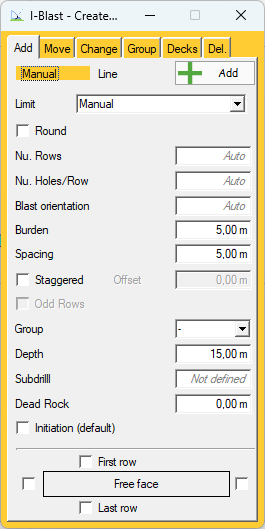
Add
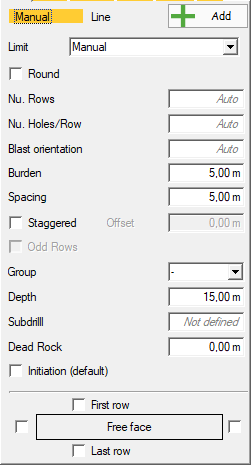
Set to location
The first allows you to choose between two add-on modes:
- Manual:
- The first left click defines the starting point for the line. A hole is added under the mouse pointer and then a line of holes runs between this first hole and the current position of the pointer.
- The second click validates the position of these holes and adds them to the blast plan. New rows are then positioned between the first and the current position of the pointer.
- The third click validates these new rows and inserts the corresponding holes into the blast plan. Insert mode is then deactivated.
- Line: when a line is present in the blast plan, this option allows you to place rows of holes along it. To do this, simply select it from the drop-down list and proceed in the same way as in manual mode (above).
The following parameters can be used to configure holes and rows.
A Circular option allows you to create concentric circles of holes rather than successive rows.
A Staggered option allows you to create diamond-shaped mesh holes. Once selected, the Offset allows you to adjust the mesh offset between rows. Odd rows allows you to apply the offset to odd rows or not.
Blasting parameters
The Banquette and Spacing parameters are used to manage the inter-hole and inter-row spacing.
Number of Rows: If specified, when holes are added in the second phase, the number of rows is no longer increased according to the position of the mouse but is fixed by this parameter.No. Holes/Row: If specified, when holes are added in the first phase, the number of holes is no longer increased according to the position of the mouse but is fixed by this parameter.Blast orientation: Used to set the angle of the first row.
Holes parameters
Group: Choice of group number to which to associate the holes to be createdDepth: Depth of holes to be created.Overdepth: Overdepth taken from the depth of the holes to be created. A hole with excess depth will reach theDepthdefined.Burden: Burden of the holes to be created.Initiation: If this option is enabled, a default cabling will be created with 17ms between holes and 42ms between rows. These times can be modified using the modify group times function.
Move
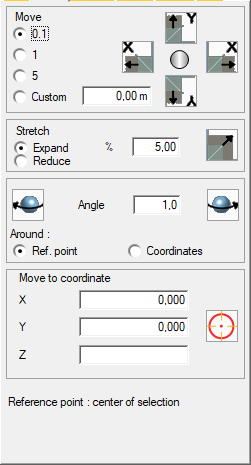
Move
Used to move selected holes step by step.
The selector on the left allows you to choose between pre-filled values or a custom Value.
Use the buttons on the right (⬅️x, ⬆️y, ➡️x, ⬇️y) to move the hole in the selected direction.
Stretch
Enables the mesh of selected holes to be enlarged or reduced by the percentage entered in relation to the reference point.
Angle
Used to apply an angle in degrees to the selected holes:
- Either from a reference point (see inset below)
- Or from coordinates
Move to coordinates
Moves the selected hole to the specified coordinates. Click on the  button to execute the move.
The reference point used for
moveoperations is, by default, the centre of the selection or can also be the last hole clicked.
Change
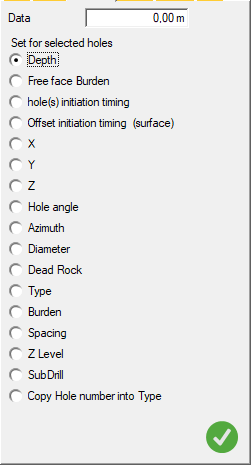
This tab allows you to modify a different panel of information about the selected holes:
- Depth
- Free face burden
- Hole initiation timing
- Offset initiation timing (surface)
- X
- Y
- Z : Surface or downhole z can be changed
- Hole angle
- Azimuth : a potentiometer is displayed to select the azimuth in the current view
- Diameter
- Dead rock
- Type : personnalized name for the hole
- Burden
- Spacing
- Z level
- Sub drill
- Copy hole number into Type : overwrites the type of holes (their name) with their numbers (index)
Group
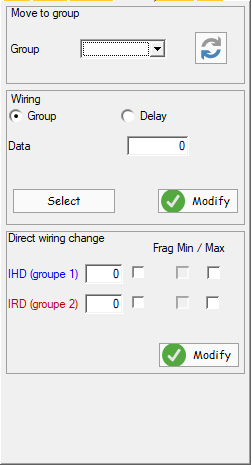
This tab is used to make changes to groups of selected holes.
In particular, it allows you to :
- Position all the selected holes in a hole group: click on the button to apply the change.
- Change the wiring of the entire wiring group at the same time.
TheSelectbutton is used to select all the holes corresponding to the wiring group or delay entered.
TheEditbutton is used to apply to the selected holes. - Modify the wiring of all holes with the same delay between them.
TheSelectbutton allows you to select all holes corresponding to the entered delay.
TheModifybutton allows you to apply the delay to the selected holes.
Example :
If "1" is entered in the "Data" field and the "Select" button is clicked, all the holes in group 1 will be selected. It is then possible to enter "3" in the same input field in order to move all the selected holes from group 1 to group 3.
The main function is to be able to do the same with the wiring delay.
If you enter "17" in the "Data" field and click on the "Select" button, this function will select all the holes with a delay between holes of 17ms. It is then possible to enter "42" in the input field to increase this delay from 17ms to 42ms for all the holes selected.
- Modify the delay between wiring groups: allows you to quickly modify the delay between holes on the whole of wiring group 1 or wiring group 2. To do this, enter the delay in the dedicated field, tick the box next to it and click on the
Modifybutton.

Fragmentation Max
Checkboxes column Frag Min/Max affects to each connector of type 1 or 2 the delay that minimise or maximise the fragmentation inside the blast perimeter.
Max, each connector is affected with : $t = \frac}$
Where $l_$ is the connector lenght between the two holes it connects and $V_p$ is the velocity of the P waves.
Advanced function, use only at your own risks. Maximising fragmentation inside blast perimeter will have a huge impact on the rocks around blast perimeter also.
Minnot available.
Decks
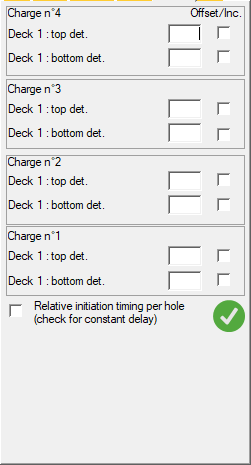
This tab allows you to quickly change, on a set of selected holes, the delay applied to the detonators on four different charges. To do this, simply enter the value of the delay to be applied to the detonator, tick the adjacent box and click on the Validate button.
The checkbox Relative ignition time per hole is used to assign a constant delay to each detonator in the hole. For example, for a charge with 3 charges containing 3 detonators at the bottom of the charge, if we have specified 10ms on the bottom detonator of charge n°1, on each of the bottom detonators of each of the charges, the time will be 0ms, 10ms and 20ms respectively.
Stuffing is not counted as a charge.
Load n°1 is the load furthest down the hole.
If a detonator is not present but a time has been specified, it will not be created.
Delete
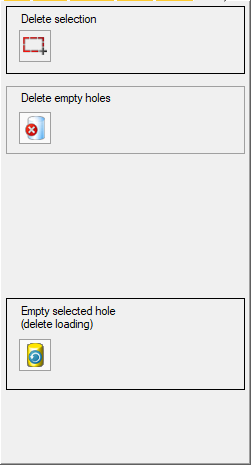
This tab allows you to do deletion actions on holes:
- Delete all selected holes
- Delete all empty holes
- Empty all selected holes (delete de loading)
Please note that each of these actions is permanent.