I-Blast > Blast Management > Blasts > Design > Design > Holes > Import >Import DXF/DWG
Overview
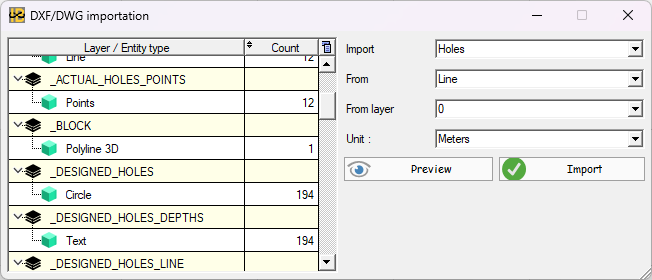
This window allows you to import certain types of objects from a DXF or DWG file as I-Blast holes, lines, annotations, and point clouds.
Functions
File content
The table on the left displays a preview of the objects contained in the file.
These objects are grouped by layer and object type.
Importation
To import elements from a DXF/DWG file, you must define:
- the type of I-Blast element to be imported.
These can be holes, lines, annotations, or point clouds. - the type of object in the file from which these elements are to be constructed.
The type of object allowed depends on the type of I-Blast element chosen. - From which layer of the file the elements should be imported.
It is possible to choose a specific layer or All layers. - The unit used in the file.
By default, the selector will be set to the unit defined in the file.
It is possible to change this if the unit in the file has not been defined correctly and the positions of the imported objects appear to be incorrect.
The Preview button allows you to display the objects to be imported into the blast plan in order to check their consistency.
For point cloud elements, this function will only give the number of elements found.
The Import button imports the defined elements into the blast plan.