I-Blast > Blast management > Blasts > Design > Design > Loading > Smart
This window enables automatic hole loading.
There are 2 loading modes:
- according to a vibration objective
- depending on the burden and compressive strength to meet fragmentation and projection targets
Overview
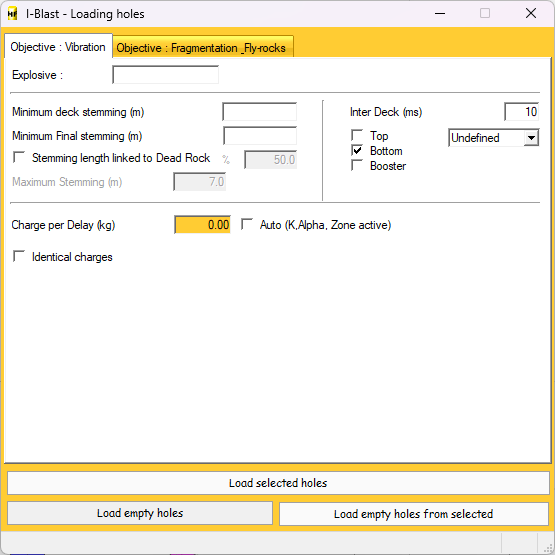
Objective Vibration
Objective Fragmentation/Flyrocks

Advanced mode
Simplified mode
This mode automatically loads holes according to the average value of compressive strength per hole calculated from MWD.
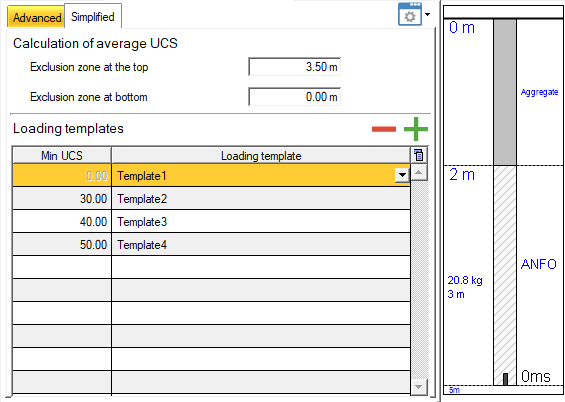
The parameters Exclusion zone at the top and Exclusion zone at bottom are used to define the zone over which the average UCS is to be calculated for each hole.
These parameters can be used, for example, to eliminate the stemming or fixed bottom loading from UCS calculation.
It is then necessary to define the Loading Templates to be used for each UCS range.
Each range is defined by the minimum UCS from which it is applied and the loading template to use.
Clic on  to add an UCS range.
Clic on  to delete the selected range.
The min UCS and Loading template can be edited directly in the table.
A preview of the selected range template is displayed on the right of the window.
In the example above, holes with an average UCS between 0 and 30 will be loaded with template Template4.
Those with an average UCS between 30 and 40 will be loaded with template Template1.
Those with an average UCS between 40 and 50 will be loaded with Template3.
And those with an average UCS greater than 50 will be loaded with template Template2.
Save and load loading parameters
The  menu is used to manage sets of parameters for this module.
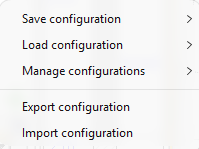
Save configuration allows you to save a parameter set for the current blast or for the entire site.
If a configuration has been reloaded, it can also be overwritten with the current parameter set by selecting the Overwrite configuration sub-option.
The parameters set includes the chosen mode Advanced or Simplified and all the parameters of both modes.
Load configuration allows you to restore a previously saved parameter set.
Manage configurations allows you to ‘Rename or Delete saved parameter sets.
The Export configuration and Import configuration options let you save the current configuration or load a configuration to/from a file.
A parameters set is only valid for the database on which it has been defined.
By loading a parameters set defined on another database, the links with explosives and loading models will no longer be valid.