I-Blast > Blast management > Blasts > Design > Global > Views > 
Preview
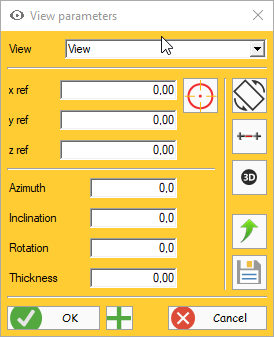
This window is used to define the properties of the views in the design window.
A view corresponds to a tab in the design window. In
version, it is possible to open several at once.
View properties
The View drop-down list is used to select the view to consult/modify.
The x ref, y ref and z ref fields indicate the coordinates of the view origin point.
This is the reference point through which the grid displayed in the design windows passes.
The Azimuth, Inclination and Rotation fields define the view's orientation.
These are three rotation angles applied successively:
Azimuth: Clockwise rotation around the vertical Z axisInclination: Trigonometric rotation around the X axisRotation: Clockwise rotation around the Z axis
Thickness displays a section of the blast plan of the specified thickness.
This section passes through the previously defined reference point.
Only holes whose top is at a distance less than Thickness/ 2 from the plane defined by the view will be displayed.
A value of 0 disables the section and displays all holes.
The OK button applies the defined properties to the active view
The  button creates a new view with the defined properties.
The Cancel button restores the properties of the active view in the fields.
Tools
 : Points the reference point directly at the plan view.
 : This button is used to find the best view for the blast.
This view corresponds to the plane passing best through the hole top point.
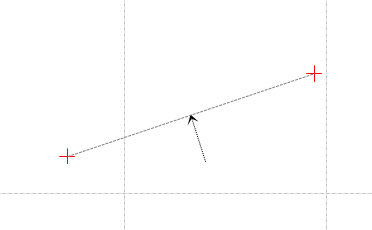
 : This button is used to quickly define a view perpendicular to the current view.
After clicking on this button, draw a line on the plan view corresponding to the desired "cross-section" view (one click per end).
A third click, on either side of the line, defines the direction of the view.
 : Retrieves the orientation of a 3D view.
Clicking on the button opens a list of saved 3D views, allowing you to select the one to use.
If the 3D view window is open, an additional option Current view allows you to use the current view in this window.
Double-clicking on a view in the list fills in the Azimuth, Inclination and Rotation fields from the selected 3D view.
 : Loads the parameters of the blast main view.
 : Saves the current parameters as the blast main view.
The blast main view is the view used for previews, reports and the default view displayed when the design window is opened.
This is generally the view in which you can best see the blast.