The tables in I-Blast have several common functionality.
They can be sorted by clicking on the header of the column on which the sort should be performed.
They can be filtered according to the value of a column by clicking on the 🔍 button to the right of the column title.
Right-clicking on the column header row provides access to more sorting and filtering options.
It is also possible to perform several operations on the tables by clicking on the  button at the top right or by right-clicking on them.
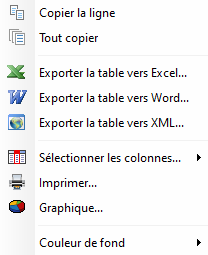
- Copy the row or the entire table to the clipboard
- Export table to different formats
- Select the columns to display
- Print the table
- Generate a graph of the table data
- Change the background color of the selected row