Overview
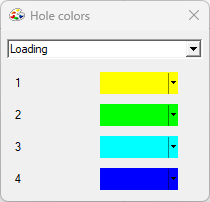
This window allows you to change the method used to color holes.
Loading
This option allows you to color the holes according to the type of loading (usually the loading template used).
This is the default option in I-Blast.
It is possible to change the colors of each type of loading using the color pickers.
Loading symbols
This option allows you to replace the color display of the types of loading with symbols.
This method can be useful when printing the blast plan in black and white.

Drilling machine
This option allows you to color the holes according to the drill assigned to them.
You can change the color assigned to each drill by going to the drill management window.
Others
The other options allow you to color the holes based on hole data.
The data available for coloring are:
- Depth
- Charge per hole
- Charge per delay
- Average UCS value
- Minimum detonation timing
- Hole angle
Coloring is done according to a color scale ranging from purple (minimum value) to red (maximum value).
