I-Blast > Blasts management > Database > Templates > Drilling machines
I-Blast > Blast Management > Blasts > Design > Design > Set up > Drilling machines
Overview
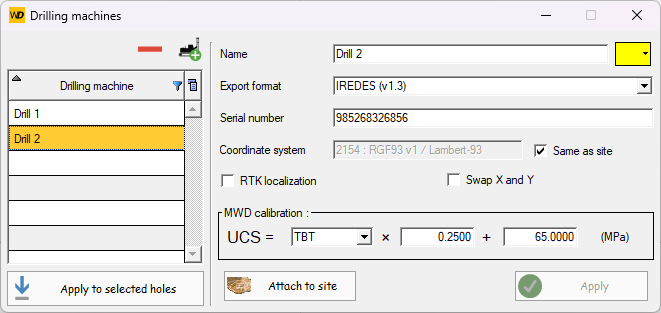
This window allows you to manage the drilling machine for the site or the blast.
If the window is opened from the Blast Management window, the drill templates for the site will be displayed.
If it is opened from the blast design window, the drills used for this blast will be displayed.
Drilling machine list
The left side of the window displays the list of drills.
The  button allows you to add a new drill.
When you click on this button, a menu offers several methods for adding a drill.
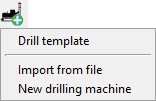
- If the window is opened from the design of a blast, an option is offered for each drill template on the site that are not already in use so that they can be assigned to the blast.
Import from fileallows you to create a drill and pre-fill some of its properties by retrieving them from a file from the drill.New drillallows you to add a blank drill to edit manually.
The  button deletes the selected drilling machine.
The Apply to selected holes button only appears when managing the blast's drill. This button indicates that the selected holes must be drilled or have been drilled by the drilling machine selected in the table.
Selected drilling machine
The right side of the window displays and allows you to modify the properties of the drill selected in the table.
The properties are:
- The
Nameto give to the drill - Its color (allows coloring of holes according to the drill)
- The
Export formatof the files to send to the drill
The supported formats are IREDES v1.3 and IREDES v1.0. - The
Serial numberor reference number of the drill
This field is used to identify the drill in the files. It is automatically filled in when importing a drill from a file. - The
Coordinate systemused by the drilling machine
You can indicate that: - The drill uses the same system as the site by checking the box
Same as site - The drill has an
RTK localizationsystem (centimeter-level positioning) - Whether it is necessary to
Swap X and Ywhen exporting drill files.
This option is necessary, in particular, for drills manufactured by Epiroc. - The
MWD Calibrationis used to define the transformation to be applied to the Measurements While Drilling to obtain the local UCS value for the hole.
To define this transformation :- select the compound parameter to be used as the basis for the calculation:
- TBT = $Feed Pressure * \sqrt}$
- SOMERTON = $Feed Pressure * \sqrt}$
- ENERGY = $Feed Pressure + \frac $
- set the calibration coefficients
- select the compound parameter to be used as the basis for the calculation:
The Apply button allows you to confirm the changes made to the drill.
If another drill is selected or the window is closed without saving the changes, a message will ask whether they should be saved or canceled.
The Attach to site button allows you to save the selected blast's drill in the site.
If the drill is already associated with a site template, you will be prompted to choose whether to update the template or create a new one.
This button is only displayed if the window was opened from the blast design.