I-Blast > Blasts management > Analysis
This tab allows you to perform various analyses on the selected blast data.
Overview

Seismic
Overlap
Relates the time and detonation of blast charges.
See page Overlap
Attenuation law
Calculates ground and air attenuation laws based on various parameters.
See page Attenuation law
Seismic
Visualize and analyze the seismic signal from a blast.
For more information on this window, see the Seismic analysis page.
SH (Signature hole)
For more information on this window, see the Signature hole page.
Time scale
This button opens the time scale window, showing the site's blasts with their maximum vibration level on a time axis.
Audit
Drilling
Displays and analyzes hole drilling for the selected blast.
For more information on this window, see the Foration Audit page.
Hole table
This button opens the hole table window for the selected blast.
The menu below this button lets you export holes in txt or Excel format.
Loading
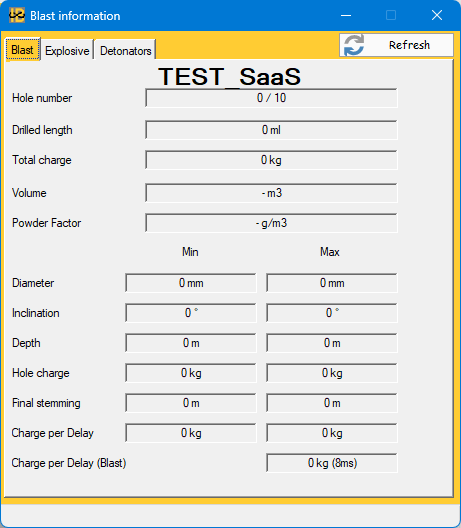
This window allows you to analyze the loading of holes in the selected blast.
Three tabs are available:
- The
Blasttab shows a summary of all the hole loadings for the selected blast. - The
Explosivetab displays information on the explosives used for the selected blast (grouped by explosive type). - The
Detonatorstab displays information on the detonators used for the selected blast (grouped by detonator type).
Cost
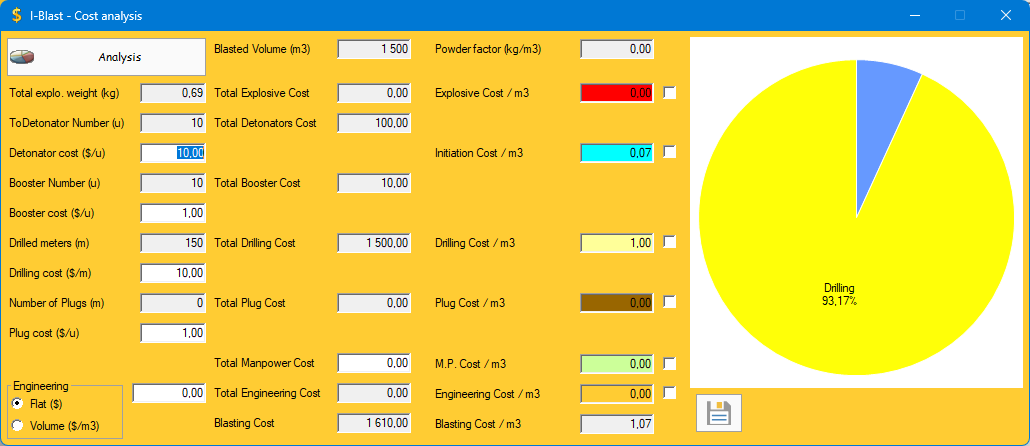
This window displays detailed costs for the selected blast, as well as a summary graph of all blast costs.
From this window, you can enter the unit cost of the products and services used for the selected blast.
GHG
Calculates the carbon footprint of the selected blast.
For more information on this window, see GES.